

HyperwisorIOT instance. This page pairs each method with
its signature and a copy-paste example.
In the examples,
targetId is where a message is routed (your dashboard/user).
Read it from an incoming command’s from, or from your product configuration.Core
begin()
Initialize everything — Wi-Fi, provisioning, the realtime connection, and command
handlers. Call once in setup().
loop()
Keep the connection alive and process incoming messages. Call every loop().
setApiKeys()
Set the product’s API key and secret key.
Identity
Provisioning
Set Wi-Fi and identity. Persisted inPreferences, so you only do this once.
Receiving commands
setUserCommandHandler()
Register a callback for commands sent from a dashboard.
sendTo()
Send a message to another target, building the payload inline.
JSON helpers
Navigate an incoming command payload without parsing by hand.Updating widgets
updateWidget()
Push a value to a dashboard widget by its widget ID. Overloads cover the common
types.
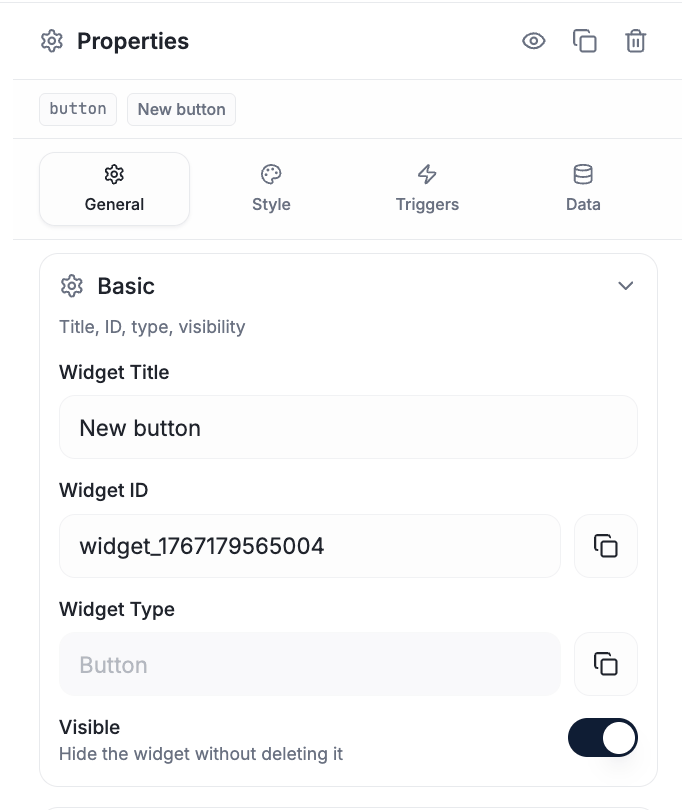
Copy a widget's ID from General → Basic — this is the value your update calls reference.
Specialized widget helpers
Dialogs
Show a dialog on the user’s dashboard.showDialog takes an icon; the named
helpers are shortcuts.
Database
Insert, read, update, and delete records. Each has a fire-and-forget form and a…WithResponse form that returns the result.
Sensor data logger
Onboarding
SMS
Authentication
Time & date (NTP)
GPIO state persistence
Remember pin states across reboots.Device status
See full sketches
Complete example programs.