

target_id (where a message is routed — your dashboard/user)
and, for widgets, a widget_id. Read target_id from an incoming command’s
from, or from your stored configuration.
Lifecycle
Credentials
Connection state
Receiving commands
Register a handler for a named command. The handler receives the sender ID and the payload ascJSON.
Responding & emitting
send_response replies to a command’s sender; emit sends a
command/action/params message to any target.
Updating widgets
Push a value to a dashboard widget by its widget ID (enableHYPERWISOR_ENABLE_WIDGET).
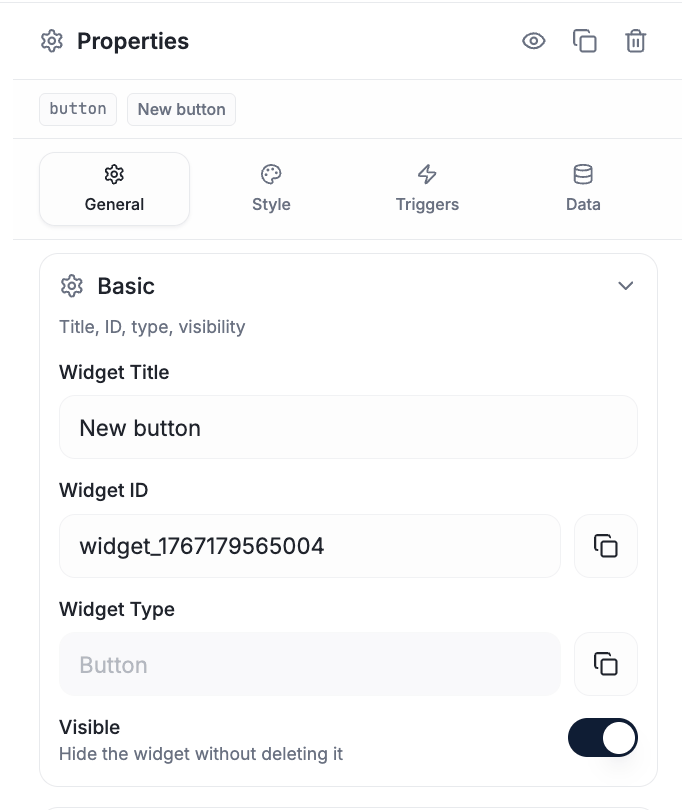
Copy a widget's ID from General → Basic — this is the value your update calls reference.
Dialogs
Show a dialog on the user’s dashboard.Board port (optional)
Provide ahyperwisor_port_t of function pointers for a specific board’s GPIO
whitelist, display backlight, or sensors, and register it before init:
Feature modules
The umbrella header pulls in feature headers — their signatures are the source of truth:Examples
A real project walkthrough.
OTA updates
Enable over-the-air firmware.