

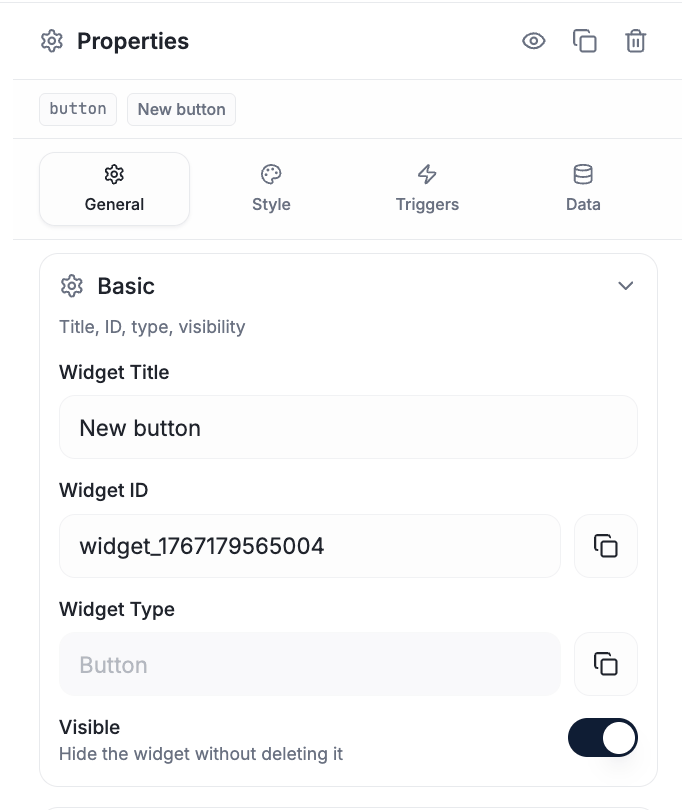
The General tab — Basic (title, ID, type, visibility) sits first for every widget.
Basic
The identity of the widget. Present on every widget.Widget Title
A human-readable name for the widget (copyable). It’s for you — organizing and recognizing widgets in the designer. It is not the binding key.Widget ID
The most important field on the tab. The widget ID is how everything else addresses this widget:- Firmware pushes values to it —
device.updateWidget(targetId, "myWidgetId", value) - The core loop is built on it
- It’s copyable, so you can paste the exact ID into firmware
Widget Type
Read-only — the kind of widget this is (button, gauge, slider, …), copyable
for reference. You can’t change a widget’s type here; add a different widget
instead.
Visible
A toggle for whether the widget shows on the dashboard. Hide a widget without deleting it — useful for work-in-progress, or to reveal it later from a script or a trigger.Content & Behavior (per widget)
The middle of the General tab is the widget’s functional options — what it shows and how it behaves. This is the part that changes per widget. Style (colors, fonts, borders) lives in the Style tab; this section is about function, not looks. Typical content/behavior options by widget:The full option list for each widget lives in the
Widget Reference. This section is where those
functional settings appear in the tab; the reference documents each one.
Layout
Always at the bottom — where the widget sits and how big it is.Position
- X — horizontal position on the canvas
- Y — vertical position
Size
- Width
- Height
How the tabs fit together
Binding by widget ID
How the ID connects to device data.
Triggers
Make the widget send commands.