

Path A — Real hardware (ESP32)
With the Arduino library installed, flash the minimal sketch:
Open the provisioning page, enter your Wi-Fi and device details, and the device
restarts and connects. (Full detail: Provisioning.)
Path B — No hardware (LiveLink Simulator)
No ESP32 on hand? Use the Studio’s LiveLink Simulator (Develop → LiveLink Simulator). It simulates both sides of the connection so you can complete the loop with nothing but the browser.1
Open LiveLink
In your product’s Studio, open LiveLink Simulator.
2
Connect the Device side
Give the Device Side a device ID and connect. It’s now a live stand-in for
real hardware.
3
Connect the App side
Connect the User / App Side with a user/session ID to see traffic in both
directions.
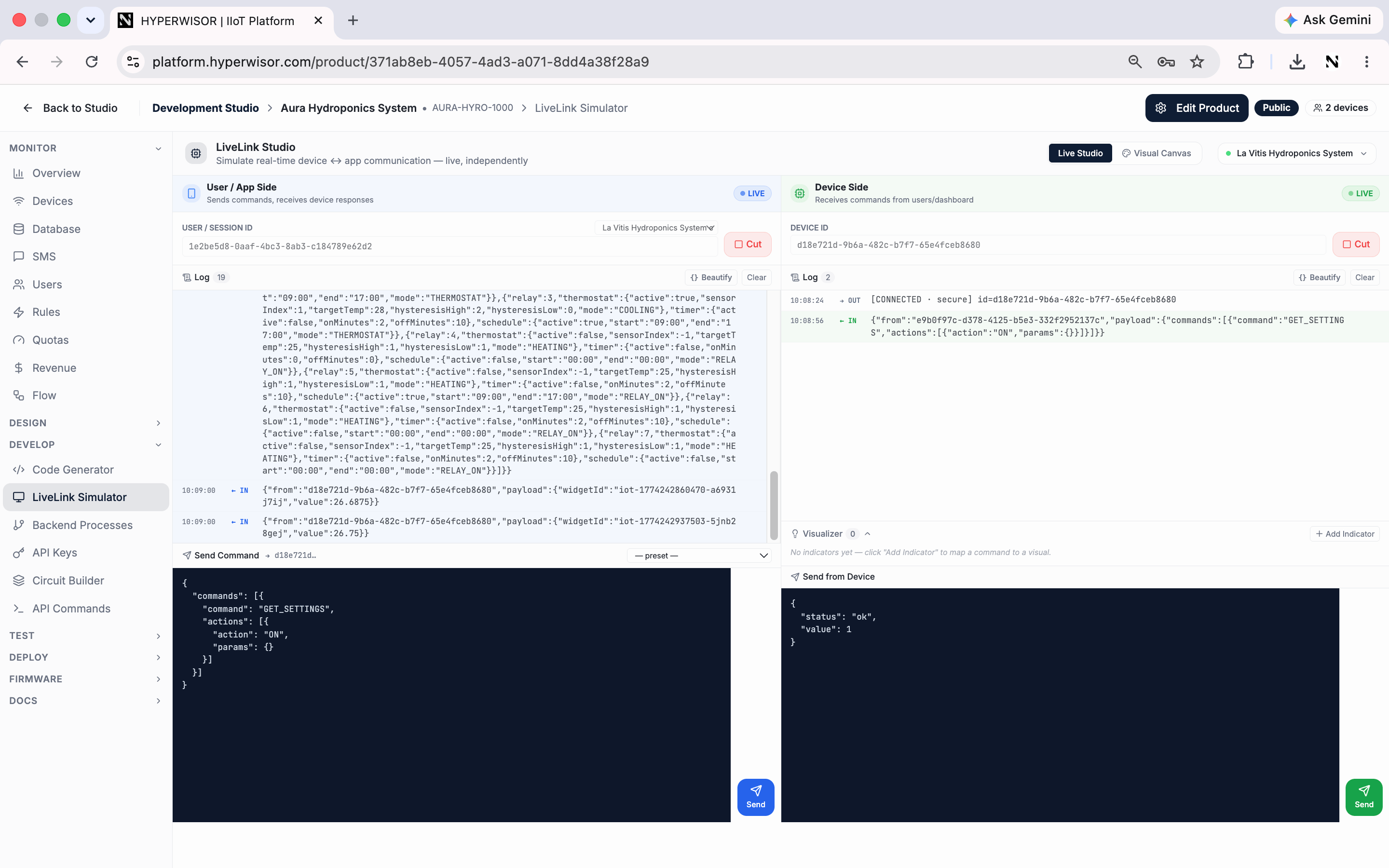
LiveLink Simulator — both sides connected over the secure relay, standing in for real hardware.
Either a real device printing its ID and connecting, or both sides of LiveLink
connected and showing “live traffic.”
Next: the core loop
Values up, commands down.